
Flag Football Playmaker X
True Partners, LLCSports
4.464.00 Reviews
- Version
- 1.10.0
- Installs
- 50.00K
- Age Rating
- Everyone
Screenshots
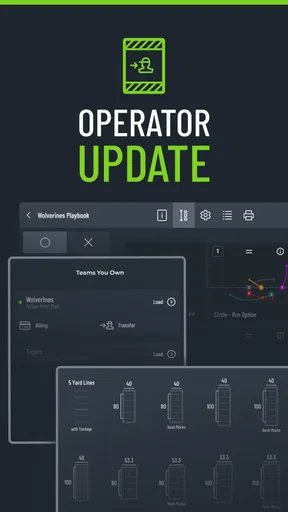
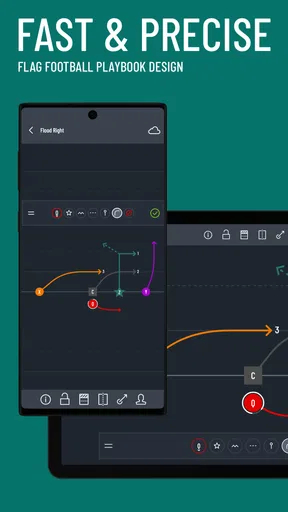
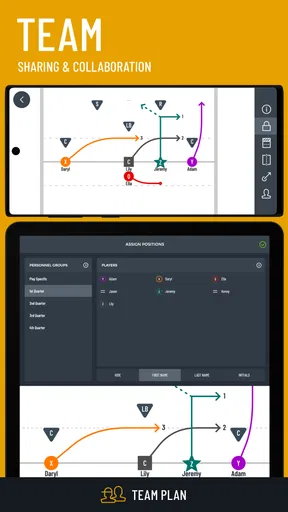
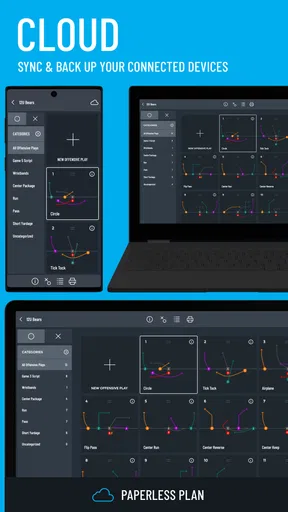
Our Review of Flag Football Playmaker X
 Analysis by Appyee
When I help organize a flag football team, the hardest part is rarely coming up with one clever play. The real challenge is turning a rough idea into something players can understand quickly, coaches can reuse, and everyone can carry onto the field. Flag Football Playmaker X is built around that practical problem. I found it most useful as a planning and printing tool for teams that want to create a playbook, prepare wristbands, and keep their formations more consistent from practice to game day.
Flag Football Playmaker X is a free sports app from True Partners, LLC, with optional in-app purchases priced from $7.99 to $12.99 per item. It is aimed at flag football rather than general sports planning, which gives its workflow a more focused feel than a blank drawing app or a collection of coaching notes. The app has a 4.4 average from around 261 ratings, and its audience has grown beyond 50 thousand installs. Those figures suggest a useful level of interest without making the app feel like an enormous, impersonal platform.
My overall impression is that this is best understood as a team-preparation utility. It does not replace coaching knowledge, communication, or practice. Instead, it helps turn those things into visual material: formations, routes, assignments, printed pages, and wristband references. That distinction matters because a new coach may expect an automatic play-calling system, while an experienced coach may appreciate having control over the design.
How the playbook workflow feels in everyday use
I found the workflow most useful when I treated each play as something players must recognize quickly, not merely a diagram to file away. Before printing, I’d check whether the play’s name, formation, and key assignment are easy to distinguish at a glance; that small review can prevent a crowded reference from becoming a game-day distraction. The next section looks at how those design choices carry through the practical routine.
Readable planning starts with a clear visual job
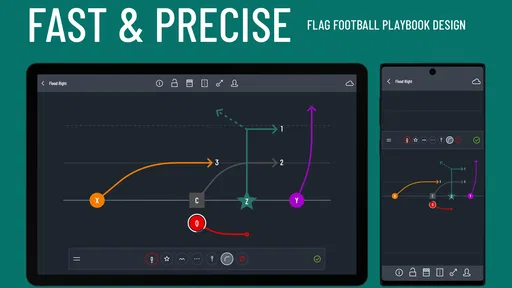
The strongest reason to use this app is that flag football plays are easier to discuss when everybody can see the same structure. A verbal instruction such as “you release inside, then break toward the sideline” can be understood differently by different players. A diagram gives the team a shared reference, especially when a play includes motion, blocking responsibilities, timing, or a backup route.
I would use the app before a practice rather than waiting until game day. I can sketch the plays I want to teach, arrange them into a small package, and print the material while the instructions are still fresh. That creates a better bridge between the coach’s notebook and the player’s actual wristband or handout. The value is not just visual appearance; it is the reduction of repeated explanations.
There is also a useful discipline in having to represent a play on a diagram. If a route is difficult to draw clearly, that may reveal that the play itself is too complicated for the team. In that sense, the app can act as a planning check. A playbook that looks crowded or confusing on paper probably needs simplification before players are asked to execute it under pressure.
Printing changes the app’s role
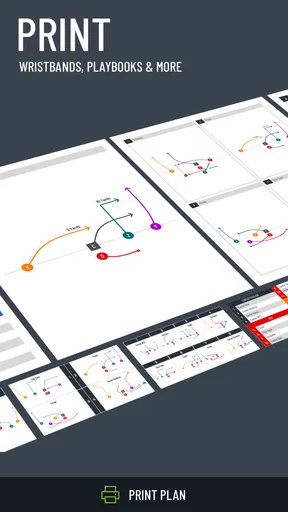
Many sports apps stop at the screen. This one is more practical for teams that still rely on paper, printed play sheets, or wristbands. That makes it suitable for youth leagues, recreational teams, school programs, and coaches who do not want every player depending on a phone during a match.
A realistic workflow would be to prepare a compact set of core plays, print a coach-facing playbook for teaching, and create a shorter wristband reference for players who need quick reminders. I would not put every variation on a wristband. The better approach is to reserve the wristband for the information a player can identify rapidly: a play name, number, formation cue, or concise assignment. The fuller explanation belongs in the playbook.
This separation is one of the more important practical insights. A playbook and a wristband serve different reading conditions. The playbook is for learning when there is time to study. The wristband is for recall when attention is divided by noise, movement, and a fast huddle. Designing both from the same material can keep terminology consistent, but they should not be treated as identical documents.
Navigation and readability depend on the coach’s design choices
I found the app’s focused purpose easier to understand than a general-purpose drawing program. A blank canvas can technically produce a football diagram, but it also leaves the coach responsible for inventing the entire visual system. A dedicated flag football tool is more appropriate when the goal is to move from play concept to usable team material instead of creating artwork.
Still, a focused tool does not automatically make every play readable. Coaches should keep a consistent naming system, avoid unnecessary variations, and check every printed page at the size players will actually see. A diagram that looks fine on a large screen may become difficult to interpret when reduced for a small wristband. I would test the printout with someone who did not design the play and ask them to explain the assignments. If they hesitate, the problem is probably the layout or labeling rather than the player.
For players with reading difficulties, the most helpful approach is to pair short text with stable visual patterns. Use the same color or symbol convention every time if the app allows that kind of design, and avoid changing the meaning of a mark from one play to another. I would also keep the number of instructions on each wristband entry low. The app can help create the material, but the coach remains responsible for making it understandable.
Different abilities call for different levels of detail
Flag football teams are rarely uniform. One player may remember a diagram immediately, another may need a spoken walkthrough, and another may understand the play only after seeing it demonstrated. The app is useful because it gives the coach a visual starting point, but it should be part of a multi-step teaching process rather than the only explanation.
For a player who benefits from larger print, I would create a separate, less crowded reference instead of expecting the standard wristband layout to work for everyone. For a player who struggles with visual information, I would use the diagram during a slow walk-through and connect each route to a spoken cue. For someone who has difficulty with quick hand movements, the wristband should be positioned and prepared before the game so that the player is not forced to manage a complicated reference during a rushed substitution or huddle.
These are not special modes I would assume the app provides. They are coaching adaptations made possible by having a printable play-design workflow. That distinction is important: the app supports inclusive preparation, but it does not remove the need to ask players what helps them perform comfortably.
Useful in noisy, bright, and time-limited settings
Game-day access is different from practice access. On a quiet evening, players can study a detailed page. On a field, they may be dealing with crowd noise, glare, weather, limited time, and the pressure of remembering an assignment while moving. A good playbook workflow should therefore produce more than one level of reference.
I would prepare a teaching version with complete routes and a game version with only the cues needed for recognition. If a player identifies plays by formation more easily than by name, the printed material should make the formation prominent. If another player remembers a simple number sequence better, the numbering should remain stable across practice and competition. The app’s value here is the ability to prepare those materials deliberately instead of improvising them on scraps of paper.
There is a trade-off between completeness and speed. Including every possible adjustment may help a coach, but it can overwhelm a player. A smaller set of well-practiced plays is often more accessible than a large playbook that looks impressive but cannot be recalled quickly. I would use the app to build a core package first, then add variations only when the team can explain the original play without hesitation.
Where the app compares well with usual alternatives
The usual alternatives are a notebook, a word processor, a general diagramming app, or a collection of screenshots and handwritten notes. A notebook is flexible and fast, but it becomes difficult to revise neatly and harder to share consistently. A word processor is good for written instructions, yet route diagrams can take longer to format. A general drawing app may offer more creative freedom, but that freedom can create extra work for a coach who simply wants a clean football play.
Flag Football Playmaker X makes more sense when the final output matters as much as the original design. Its specific emphasis on playbooks, playbook printing, and wristband printing gives it a clearer purpose than a generic notes app. I would choose the generic option instead if I needed broad collaboration, extensive document editing, or diagrams for several sports. I would choose this app when the team’s main need is to organize flag football concepts into physical references.
The app is also not a substitute for a full coaching platform if the team expects automatic scheduling, player analytics, live communication, or a large database of ready-made strategies. Its appeal is control and preparation. Coaches who want to build their own system may prefer that. Coaches who want the app to supply the system may find the workflow more hands-on than expected.
Costs, platform expectations, and practical planning
The app is listed as free, which makes it easy to try before asking a team to commit. Optional purchases range from $7.99 to $12.99 per item, so I would decide in advance whether the free experience is enough for a small group or whether the printing workflow justifies an additional purchase. For a coach, the important question is not simply the price of an item; it is whether the resulting material will save enough preparation time and reduce confusion for the team.
It is rated for Everyone, which fits its sports-planning purpose. The current version is 1.10.0, and it requires operating system version 9 or later. That requirement is worth checking before installing it on an older team tablet or a spare coaching phone. A team can avoid an unpleasant surprise by testing the app on the actual device intended for preparation, especially if several people will need access to the same workflow.
Because printing is central to the app’s usefulness, I would also plan the physical side separately. Check the paper size, make sure labels remain legible after printing, and keep a backup copy of the final playbook in a familiar file location or on paper. A digital design is only helpful on game day if the coach can retrieve or print it without a last-minute scramble.
Remaining barriers for teams and players
The biggest limitation is that visual planning can still exclude people if the diagrams are too dense, text is too small, or the team uses inconsistent terminology. An app can make a polished document that is not actually easy to use. I would treat every printed page as a communication tool and review it from the player’s perspective, not just the designer’s perspective.
Another barrier is the difference between designing a play and teaching it. A diagram does not show whether a player understands timing, spacing, or what to do when the defense reacts unexpectedly. Coaches still need to demonstrate, repeat, and invite questions. Players who do not process diagrams quickly may need a verbal explanation, a physical walk-through, or a simplified card alongside the standard material.
There can also be a social barrier when a team assumes every player should use the same reference in the same way. One player may prefer a wristband, while another may perform better with a coach’s spoken cue. I would avoid treating one format as a test of commitment. The goal is reliable execution, and the app is most valuable when it helps the coach prepare several clear ways to reach that goal.
I would skip this app if I only wanted quick tactical inspiration with no intention of designing or printing materials. It may also be a poor fit for someone seeking a highly automated, collaborative coaching suite. Its strongest use case is narrower: creating a personal or team-specific flag football system and turning it into references players can study and carry.
My inclusive verdict
I recommend Flag Football Playmaker X to coaches who want more order between the whiteboard and the field. I especially like the way its play-design purpose connects to printed playbooks and wristbands, because that supports teams that cannot or should not depend on phones during competition. The app gives a coach a practical place to shape ideas into consistent visual material.
My recommendation comes with one condition: use it as part of an inclusive teaching routine. Keep diagrams uncluttered, prepare different levels of detail, check printed readability, and ask players which cues they can use confidently. Those habits matter more than making the playbook look sophisticated. The app can support players with different ways of processing information, but the coach has to make the final material fit the people using it.
For a small recreational team, a youth coach, or a flag football organizer building a repeatable system, the free starting point makes the app worth exploring. For a coach who already has a reliable notebook and never prints anything, the benefit may be smaller. In my experience, the best reason to install it is not the promise of more plays; it is the chance to make the plays you already believe in easier to teach, remember, and access when the game becomes hectic.
The practical takeaway is simple: build fewer plays, make each one clearer, and design the playbook and wristband for the real conditions in which players will use them. That is where this sports app earns its place.
Verdict
Strengths of Flag Football Playmaker X
- Drag-and-drop play design makes route adjustments quick and intuitive.
- Useful animation tools help players visualize timing before practice.
- Supports custom formations for different team sizes and play styles.
- Play diagrams can improve communication between coaches and players.
- Designed specifically for flag football concepts rather than generic sports plays.
Limitations of Flag Football Playmaker X
- Advanced features may take time to learn for first-time play designers.
- Complex plays can become difficult to read on smaller phone screens.
- Creating a complete playbook requires considerable manual setup.
- Some teams may find the available organization tools too limited.
- The app’s usefulness depends on players consistently reviewing the designed plays.
Other Releases by True Partners, LLC
View All
Tackle Football Playmaker X
Sports4.5
Similar Picks in This Category
View All
BeSoccer: Soccer Live Score
BeSoccer apps4.3

Cricbuzz - Live Cricket Scores
Cricbuzz.com3.7

NFL
NFL Enterprises LLC2.4

Da Fit
MO YOUNG LIMITED3.6

ESPN
Disney4.5

LiveScore: Live Sports Scores
LiveScore Limited4.5
Frequently Asked Questions
What is Flag Football Playmaker X used for?
Flag Football Playmaker X is designed to help coaches, players, and teams create, organize, and review flag football plays. After exploring its play-design features, it is particularly useful for drawing offensive and defensive formations, saving play ideas, and presenting assignments in a visual format. It can support practices, game preparation, and team communication, although it does not replace real coaching or on-field training.
Is Flag Football Playmaker X suitable for beginners?
Yes, the app can be useful for beginners as well as more experienced coaches and players. Its visual playbook approach makes it easier to understand player positions, routes, movements, and responsibilities without relying only on verbal explanations. New users may need some time to learn the available tools and terminology, but the basic concept is straightforward for anyone familiar with flag football.
Can I create and customize my own flag football plays?
The main appeal of Flag Football Playmaker X is the ability to build customized plays rather than using only fixed examples. Users can arrange players, define routes or movements, and adapt formations to match their team’s style, age group, and league rules. This makes the app more flexible for coaches who want to experiment with plays and create a digital playbook tailored to their roster.
Does Flag Football Playmaker X work without an internet connection?
Offline availability may depend on the specific version, device, and features being used. Basic play creation or previously saved content may be accessible without a constant connection, but functions such as synchronization, backups, updates, or sharing could require internet access. Before relying on the app during a practice or game, it is recommended to test the required features offline and confirm how your saved plays are stored.
Is Flag Football Playmaker X free to download?
Flag Football Playmaker X may be available as a free download, but some features can depend on the platform’s pricing model, including optional purchases, subscriptions, or limitations in the free version. Before downloading, check the current Google Play or App Store listing for supported devices, in-app purchase details, privacy information, and any restrictions on saving, exporting, or sharing playbooks.
